Why I'm building my own CLIs for agents
Over the past few months I've found my enthusiasm for MCP somewhat wane. The core vision - of connecting any data source to an LLM easily - is brilliant. But ironically the lowly CLI may be far better suited. And I've found building your own CLIs is trivial to do.
MCP's context length problem
Like mass and the rocket formula for space, LLMs have a similar constraint on context length. Processing a session requires compute resources that scale non-linearly. While memory grows linearly, the complexity of attention means that a 100,000 token session is significantly harder and slower to manage than a 10,000 token session. This becomes a real problem as context windows get into the hundreds of thousands or millions of tokens[1].
While there is loads of interesting research going on to get round this, it does mean that long context windows are currently expensive and slow to deal with.
This really uncovers MCPs biggest weakness - it unfortunately in the current design ends up using a lot of tokens.
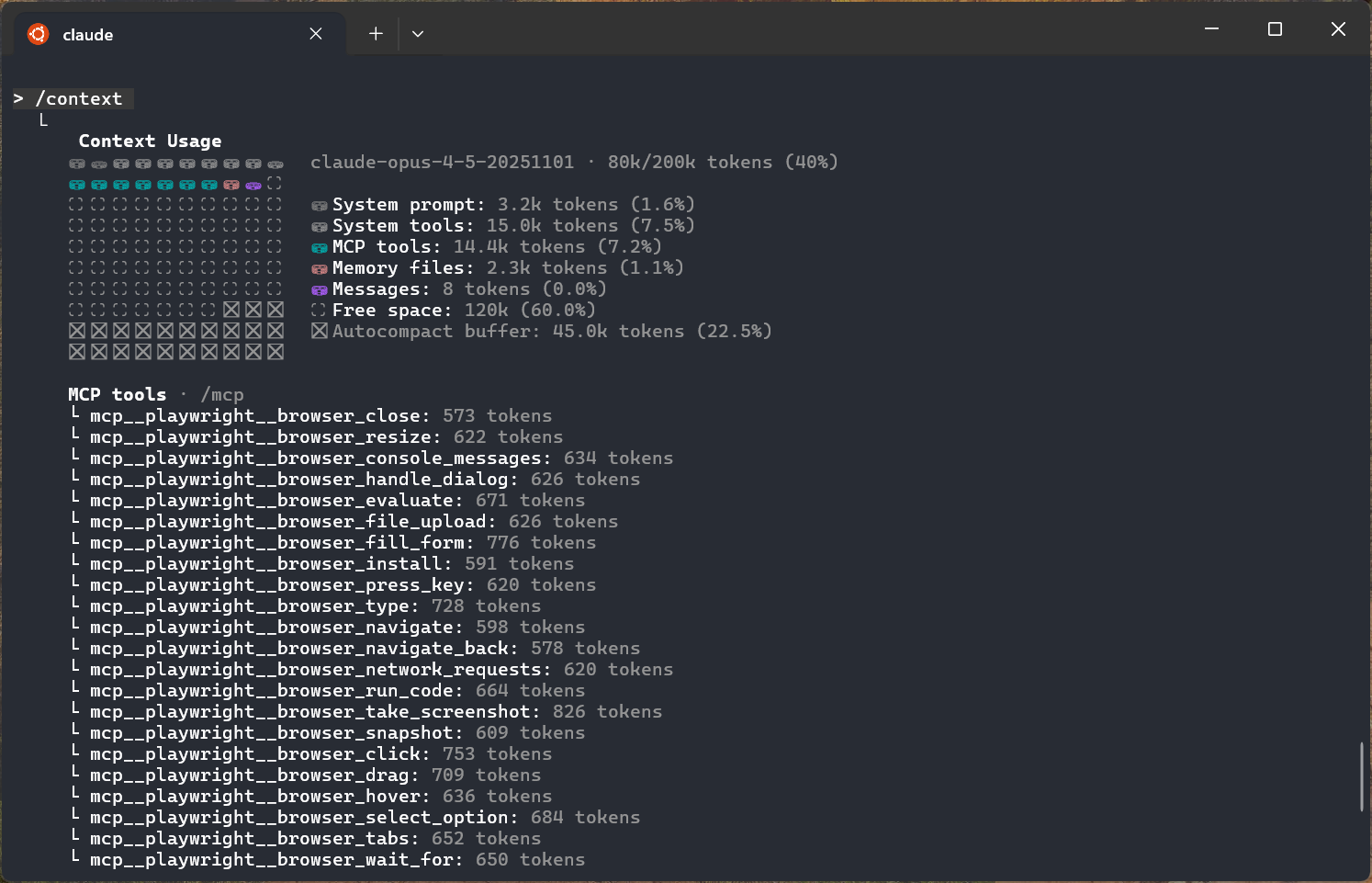
cries in tokens
Adding the popular Playwright MCP uses nearly 15,000 tokens out of the box. This is >10% of the entire context window you get to use in Claude Code just for the definitions of the various tools Playwright defines.
In "chat" UIs with LLMs I don't think this is usually as big a problem - you tend to not to rack up tokens so quickly researching products or making SVGs of various animals.
But with agents it's a real problem. I noticed this recently using the Linear MCP, which was great but ended up using so many tokens for the definitions that I was hitting context length limits far more often. I spent some time trying to disable various tools (I only really needed 2 or 3) but Claude Code doesn't seem to support disabling MCP tools selectively.
There is a lot of work going on to solve this - one idea is to have a central MCP 'search' that allows the agent to search for a specific tool and it's definitely worth keeping a close eye on. I'm sure 2026 will have many more developments around this area.
You don't need most tools until you do
The obvious alternative is to just disable MCP servers until you need them and then re-enable them. While this works, the UX is pretty poor. It also means that the agent doesn't know about them until you enable them, which is often backwards - you want the agent to know what tools to call.
And fundamentally I've found that I don't need that many tools regularly - until I do. Take Linear - when doing 'ticket driven development' with agents I really only need create issue, read issue and update issue status. But then you want to add an attachment or create labels or what not and (even if you could selectively disable tools) you are in a mess.
Enter the humble CLI
After spending a while trying to resolve the Linear MCP context issue I gave up and installed the excellent linctl CLI and put these instructions in to my AGENTS/CLAUDE.md file:
  # Create an issue
  linctl issue create --title "Fix bug" --assign-me

  # Update issue state
  linctl issue update ABC-123 --state "In Progress"
  linctl issue update ABC-123 --state "Done"

  For other commands: linctl --help
This is 71 tokens, vs the many thousands of the Linear MCP and it works brilliantly. The agent always knows how to update and create issues for that project, and as it's checked into source code everyone else who uses agents on the project is on the same page.
Building your own CLIs for everything
As this pattern worked so well, I realised that I could use this for non-software engineering tasks. It's trivial for coding agents to take e.g. an OpenAPI API spec and build a good CLI tool out of it in a few minutes - if someone already hasn't built one. You can also just copy paste the API docs into Claude Code if they don't have an OpenAPI spec and Claude will usually figure it out.
I've actually taken this a bit further and built CLIs for various websites that don't even expose a public API by browsing the site doing various actions I want to do, exporting it as a HAR file in devtools and then telling Claude to build a CLI based on the key (internal) endpoints of the HAR file. Your mileage may vary, but I use a couple of 'legacy' systems regularly and this alone has saved me so much time.
For example, you can set up a Gmail CLI (I built a very simple one with the Gmail API - setting up the torturous Google OAuth scopes took longer than writing the code!), and a Calendar CLI and then start connecting all your other tools. You can do some wonderful stuff with this. For example, get it to find email(s) reporting a bug, get it to open a linear ticket, fix it, then write a draft email in reply with the key details of what was wrong and when it's likely to be pushed out to production to resolve.
Be really careful YOLOing your personal data into random GitHub CLIs you find. If you're unsure it's often easier just to build your own from API docs.
Skills are great - but don't overlook the power of CLIs
A lot of what I've been discussing has been standardised into Skills which covers all this in far more detail. But I feel it sort of hides the importance of the CLI parts themselves. Furthermore, past simple helper scripts I'm not sure if you want to commit every single "CLI" into your repo in the skills folder - there are some real problems with it having to install dependencies, or if (like me) you are creating self contained binary CLIs you then end up with big problems running e.g. Mac binaries on Linux or vice versa.
I've also ended up just creating (git tracked) folders for each of the tasks I do day to day for each project (both software and non-software). It's great to be able to write clearly defined CLI instructions just for that project. How you use e.g. the Linear CLI in one project may be completely different to another project.
It really feels like this approach lives up to the MCP vision, without the token consumption problems that MCPs intrinsically have. While it's definitely not user friendly enough for non-technical folks to really understand, it does feel like I've just peered into the future.
I didn't have the rebirth of the terminal UI and me building dozens of CLIs on my 2025 prediction list, but here we are. I hope you have a fantastic 2026 - I'm not going to even try and guess what I'm going to be doing this time next year.
This is why you see companies charging significantly more per token for >200K tokens. And it's important to note even if we didn't have the compute and memory resource limits, you are still cluttering the context window with, at best, unrelated information and at worst contradictory information. ↩︎