How to use the Qwen 3.5 LLMs to OCR documents
I've always been really impressed with how well the Gemini models do OCR of difficult PDFs - not nicely formatted PDFs, but badly scanned images in a PDF file.
Increasingly though, Google has increased the price of their 'Flash' models. While they are far more capable than existing ones, it's overkill for document OCRing.
I've always been interested in replicating this capability with open weights models - it's not ideal sending sensitive documents to Google for OCR, and even if not, if you're doing a lot of documents it quickly becomes unaffordable with Gemini.
Running Qwen 3.5
Qwen 3.5 is an open weights model (you can download and use the model as you want) from Alibaba. They're really good, and I think it does pass a bit of a threshold of capabilities in small open weights models. Crucially, all of these models are multimodal - they can handle text and vision input. Previously the smallest vision-capable open weights models were around 4-5B parameters, so having multimodal models down to 0.8B and 2B is a big deal.
The Qwen 3.5 models come in a bunch of sizes. The more parameters the model has, the "better" the model is, but at the cost of speed and memory usage:
| Model | Type | Params | Q4_K_M Size |
|---|---|---|---|
| Qwen3.5-0.8B | Dense | 0.8B | 533 MB |
| Qwen3.5-2B | Dense | 2B | 1.28 GB |
| Qwen3.5-4B | Dense | 4B | 2.74 GB |
| Qwen3.5-9B | Dense | 9B | 5.68 GB |
| Qwen3.5-27B | Dense | 27B | 16.7 GB |
| Qwen3.5-35B-A3B | MoE | 35B (3B active) | 22 GB |
| Qwen3.5-122B-A10B | MoE | 122B (10B active) | 76.5 GB |
| Qwen3.5-397B-A17B | MoE | 397B (17B active) | 244 GB |
I did a bunch of experiments and it seems for OCRing Qwen3.5-9B is the sweet spot. The results are surprisingly good even down to 0.8B, but the quality does drop off as you'd expect on the smaller models - in my experience the smaller models tend to struggle to keep "on task" when OCRing and end up summarising documents instead, especially as they get more complicated.
How to OCR PDFs with them
The first thing I do is use PyMuPDF to extract each page of the input PDF into separate image files. This library is really fast, a lot of the others were incredibly slow at extracting them. You can use code like this (or tell your agent of choice to use it!):
import fitz

doc = fitz.open("document.pdf")
for i, page in enumerate(doc):
    pix = page.get_pixmap(dpi=100)
    pix.save(f"page_{i+1}.jpg")
This will open document.pdf and save each of the pages as page_1.jpg at 100dpi, which with some rough experiments gave good results, but your mileage may vary - feel free to increase or decrease that number.
Once you've done that, you've got two options - either running locally or doing this on a cloud provider.
Running locally
If you want to run it locally, you can try using it with LM Studio, which makes it really easy to install and run local models. Just download it, install, download the model of your choice and start the API server. I'd recommend turning off thinking mode in the settings.
I used Python code along these lines to do it (you'll want to do this in a loop if you have more than one page!):
import base64
import httpx

def ocr_image(image_path):
    with open(image_path, "rb") as f:
        b64 = base64.b64encode(f.read()).decode()

    resp = httpx.post("http://localhost:1234/v1/chat/completions",
        json={
            "messages": [{"role": "user", "content": [
                {"type": "image_url", "image_url": {"url": f"data:image/jpeg;base64,{b64}"}},
                {"type": "text", "text": "OCR this document page. Return all the text exactly as it appears, preserving layout where possible. Use markdown formatting for tables and lists. Do not add any commentary."},
            ]}],
            "temperature": 0,
        },
        timeout=120.0,
    )
    return resp.json()["choices"][0]["message"]["content"]

print(ocr_image("page_1.jpg"))
On my Radeon 9070XT I got around 3s/page of dense text. While not bad, if you're doing thousands/millions of pages it's probably too slow and you need more hardware. The smaller models were far, far faster but suffered from unreliable output quality.
I think with more tweaking I could get a lot more speed out of the hardware even on the 9b model. LM Studio isn't great at batching prefill and decode efficiently so there was a lot of wasted compute doing multiple pages. I think with time this will become incredibly viable. Equally if you have some higher end hardware then this would be very viable as an on-prem solution.
If you've got sensitive documents you want to OCR but don't want to send to any cloud provider this is really a great option, and I'm sure with time it'll get even faster.
Running with OpenRouter
If you need far more speed than this, then OpenRouter has two (at the time of writing) providers hosting the 9b variant:
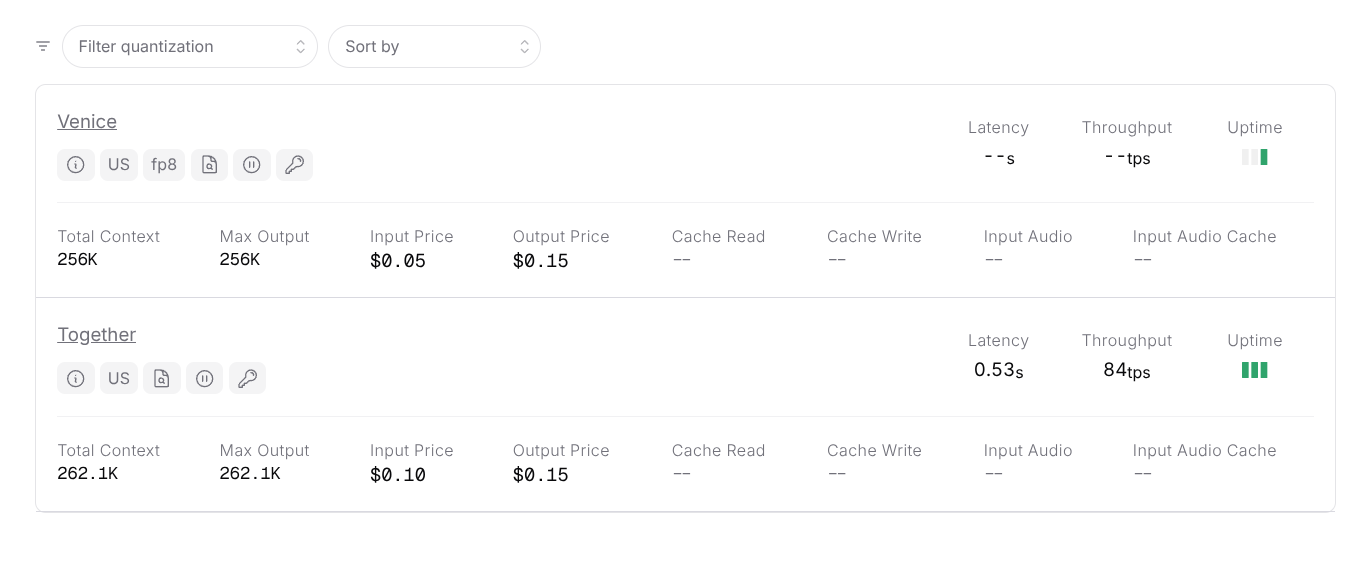 It's outrageously cheap. Each page you OCR is around 1,000 input tokens and 500 output tokens - depending on complexity - this means to OCR 1,000 pages it comes out at around 12 cents (!) with Venice.
It's also very, very fast as you can send many pages at once to OpenRouter to OCR. I didn't have any issues sending 128 pages at a time, with each page taking ~10s. This means it will take just over a minute to do 1,000 pages. I don't know if there are rate limits above that, but it's possible you could scale even further with more threads.
To do this, just replace the code above with a call to OpenRouter, and I used the ThreadPoolExecutor to send many pages at once:
from concurrent.futures import ThreadPoolExecutor, as_completed

with ThreadPoolExecutor(max_workers=128) as pool:
    futures = {pool.submit(ocr_image, f"page_{i}.jpg"): i for i in range(1, num_pages + 1)}
    for future in as_completed(futures):
        page_num = futures[future]
        result = future.result()  # blocks until this page's HTTP request completes
        print(f"Page {page_num} done")
Final thoughts
Because you can run so many threads at once, this is actually better, faster and cheaper than trying to do this with the frontier lab APIs like OpenAI or Google. In my experience, trying to do more than a few simultaneous requests to OpenAI will result in rate limits unless you're spending serious money with them. So for bulk OCR, running Qwen 3.5 via OpenRouter is genuinely a better solution than something like GPT-5 Nano. And once you've got the text out of these PDFs you can do whatever you want with them "as normal" with LLMs - search, understand and extract insights out of them like you would with any other text.
I think this is also a big deal for digitising old documents for historical research. It used to be incredibly expensive - old scanned documents wouldn't OCR properly with traditional techniques and often needed to be transcribed by hand. Running one of these models locally on a laptop could now do it for free, and throwing it at OpenRouter could chew through entire archives for pennies.